Procorem Release Notes: Version 26.2 Release 1
ProLink Solutions is pleased to announce a Procorem release.
User Acceptance Testing (UAT) Build: May 12, 2026
UAT Rebuild: June 9, 2026
Production Build: June 11, 2026
What's New
The release introduces the following new functionality.
Procorem User Interface Refresh
This release introduces a major refresh of the Procorem user interface with a cleaner, more modern look and feel designed to improve usability. The functionality you are familiar with remains unchanged. Changes include:
New Home Page—The Procorem home page has been completely redesigned. Users now see a personalized welcome section, a Quick Links area, Recent Accounts, and Recent WorkCenters. The header has been updated with a circular profile avatar, a collapsible search bar, and a redesigned Help menu that includes a Help Center link, Contact Support link, and version information.
New Quick Links—Dedicated pages have been created or updated for each Home Quick Link, including My Activity Feed, My Calendar, My Tasks, My Accounts, My Favorites (now "Favorite WorkCenters"), and a new Action Items page. The Action Items page consolidates pending email post approvals and account invitations in one place.
Account Overview and Navigation—A new Account Overview page provides at-a-glance account information, quick links to Data Views and Help Center, and a list of Recent WorkCenters. The left navigation panel now displays the account logo, account name, a collapsible menu, and a "Back to home" link.
WorkCenter-Level Navigation—All WorkCenter-level pages have been updated to mirror the new navigation style, including an updated header, revised breadcrumb bar, and a refreshed left navigation panel showing account logo, account name, and WorkCenter name.
Account Admin Navigation—The Account Administration section (Account Settings, Subscription, People & Permissions, WorkCenter Roles, Background Processes, Bulk Template Publish, Import Account, Account Apps) has been updated with the new header, left navigation, and breadcrumb styles.
Data View Navigation—A new Data Views Overview landing page has been added. All data view pages (Files, Tasks, Posts, Collaborators, WorkCenters, Account Background Processes) have been updated with the new header, left navigation, and breadcrumb styles.
Additional UI Updates—The footer has been removed from all Procorem pages. Search results, profile, Create Account, Deactivated Accounts, Reactivate Account, and Leave Account pages have all received navigation and styling updates. The Create WorkCenter button has been added directly to the Account WorkCenters page. The Create WorkCenter page now defaults to the current account.
We invite you to watch the preview video, which shares an overview of the new appearance.
Framework for Future ProcoremSecurity: Account Roles
Procorem administrators might come across new functionality related to future module security configuration. At this time, this functionality only applies to the Procorem Inspect subscription (when connecting through Procorem, not ProLinkHFA).
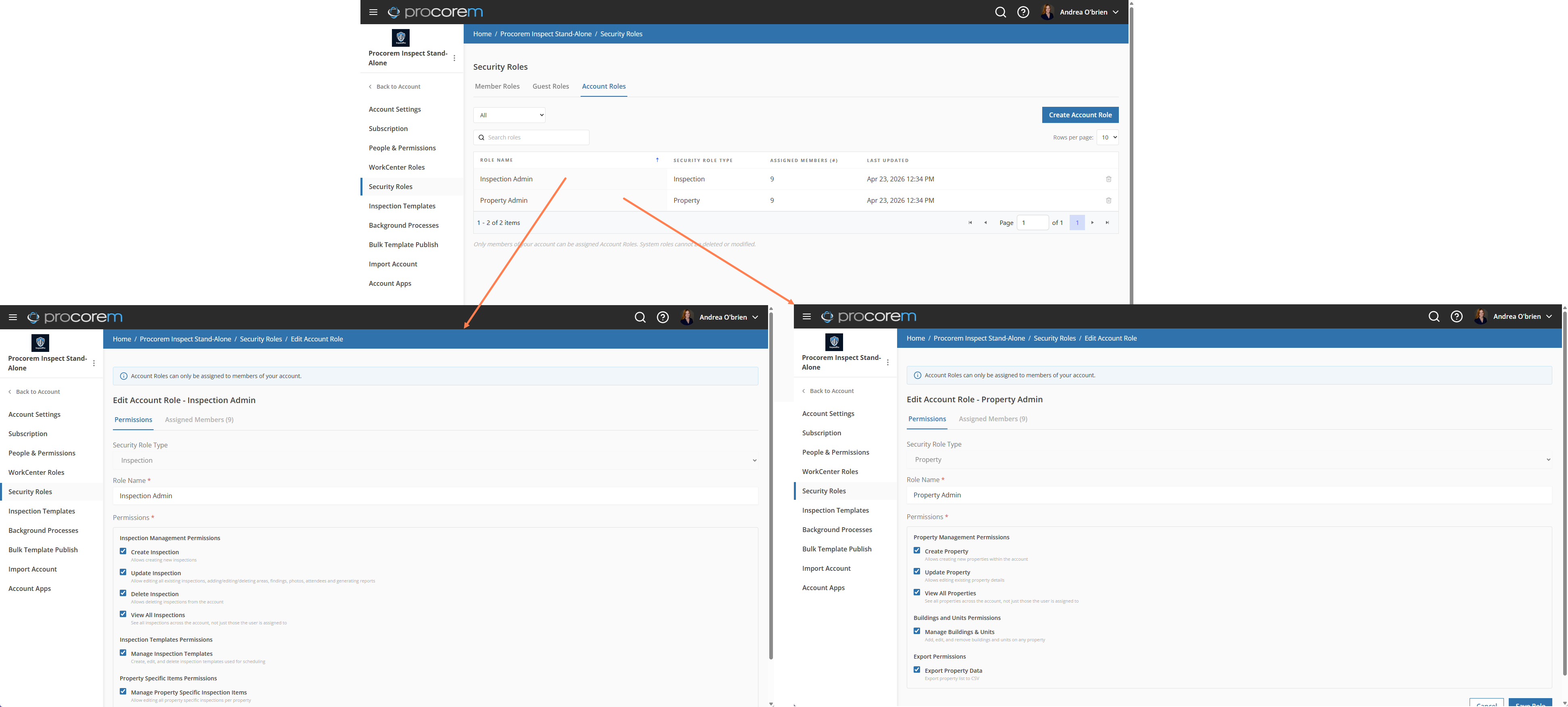
The new Security Roles page includes an Account Roles tab that will allow account administrators to:
View and manage all custom account roles in a grid.
Create new account roles.
Edit existing account roles.
Delete roles with a confirmation step.
Initial Web Content Accessibility Guidelines (WCAG) Compliance Review
ProLink has begun an ongoing effort to ensure Procorem pages meet WCAG 2.1 compliance guidelines.
Tickets Delivered
The release includes the following items.
Ticket Number | Description |
|---|---|
31424 | ProLink resolved an error that occurred when changing a user's default account role. |
31953 | When using a task flow (created from bulk template publish) where each task is due a set number of days after the previous one is completed, completing the second task in the flow would incorrectly reset the due dates for all remaining tasks to the same date, causing every subsequent task to appear due on the same day. Task flow due dates now calculate correctly throughout the entire flow. Completing a task only updates the due date of the next task in the sequence, leaving all other downstream tasks unaffected until it is their turn. |
N/A | ProLink resolved an issue where adding a collaborator in Procorem was failing for certain users. |